- HOME
- Building a business
- How to create an online course with AI in 2026 (free prompts included)
How to create an online course with AI in 2026 (free prompts included)
- Last Updated : July 30, 2026
- 80 Views
- 11 Min Read

Creating an online course isn’t an easy feat. If you’ve created a few already, then you must know what we’re talking about. But if it’s your first time creating an online course, well, let’s just say you’re fortunate.
Earlier, creating an online course used to take a few weeks to several months.
But with AI, it’s a completely different picture now. What used to take months can now be built in a few weeks, or even sooner.
In this step-by-step guide, we’ll discover how to create an online course with AI, along with the steps to launch it. There are also a few tried-and-tested prompts for you to start with.Step-by-step guide to creating an online course with AI.
Step-by-step guide to creating an online course with AI
Before we dive into the process of creating an online course with AI, let’s answer why it matters for you.
AI has transformed online course creation by assisting with curriculum planning, lesson writing, and assessment generation. Instead of spending weeks building a course from scratch, you can now use AI tools to create a structured first draft in hours, then continue to refine it with your expertise.
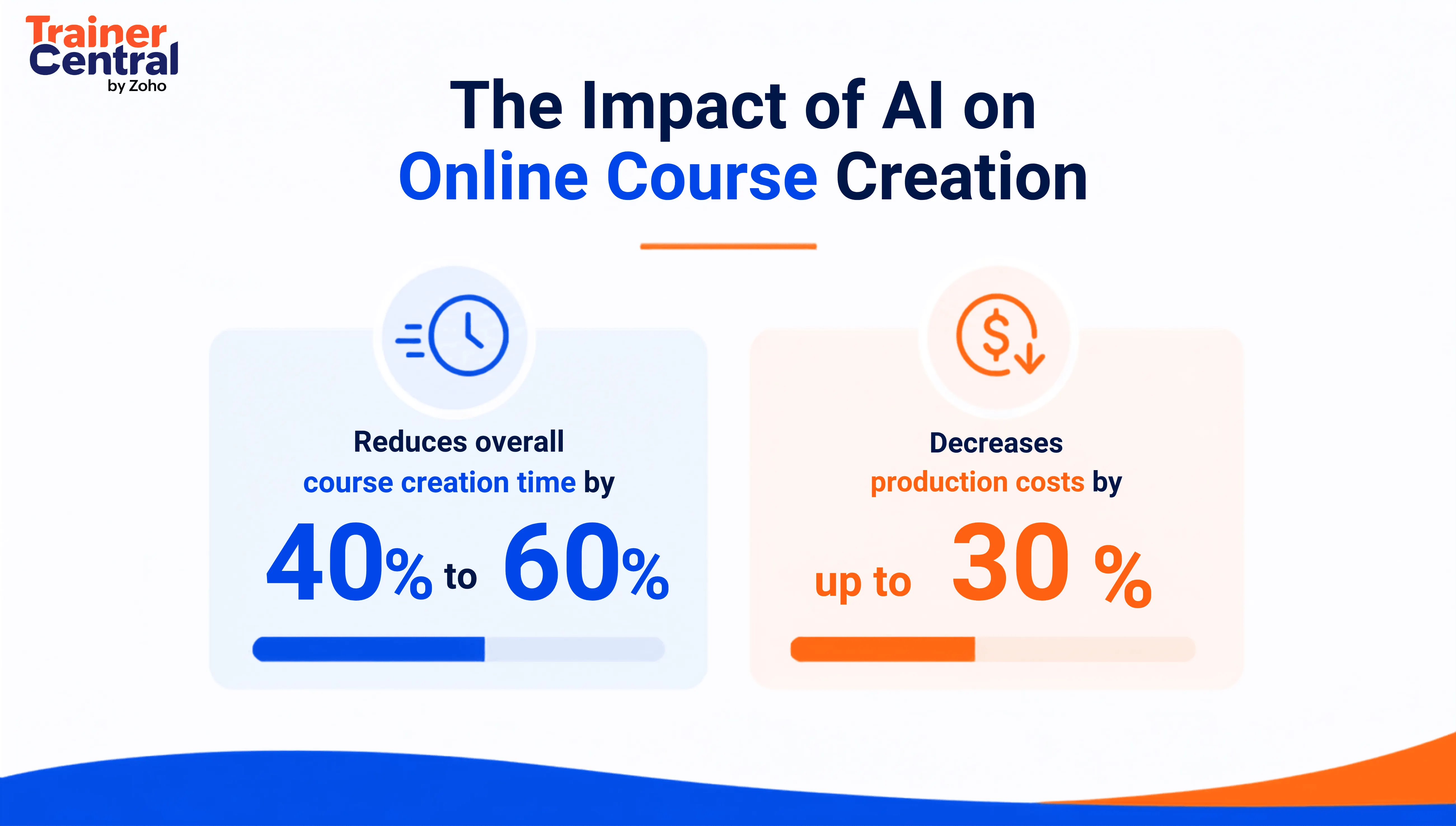
The numbers above make one thing clear. AI isn’t here to replace course creators but assist them in all possible ways. In the following sections, you’ll learn how to implement AI in every stage of the course creation.
Step 1: Choose a course idea people will pay for
If you’re a first-time course creator, the biggest mistake you’ll want to avoid is choosing a course topic nobody is looking for. A great course solves a specific problem for a specific audience.
So, you cannot simply choose a random topic and start creating an online course. You need to focus on areas where you already have knowledge, experience, or practical expertise. Then identify a problem that people are actively willing to pay for, and learn about.
This is where AI comes into the picture.
ChatGPT prompt
Act as a course market researcher. My expertise is in [your niche]. Identify the most in-demand course topics in this niche for 2026. For each topic, explain the target audience, the problems learners want to solve, the expected learning outcomes, and why people would be willing to pay for this course. Also suggest 10 compelling course titles.
Instead of letting AI choose a topic for you, include your expertise in the prompt. This will get you more relevant results, giving you the ideal topic for your online course.
As mentioned in the prompt, in-demand courses are untapped golden opportunities waiting to be monetized. But don’t miss out on the generic courses as well. They’re what makes you look like the subject matter expert! 😉
Recommended AI tools to validate your course idea: ChatGPT, Perplexity, and Google Trends.
Step 2: Build your course curriculum with AI
Once you’ve chosen your topic, the next step is to build your course curriculum.
Students decide whether to pursue the course based on the course curriculum, so it plays an important role in your course creation. And this where AI excels by saving you hours of time.
Instead of starting from scratch, you can use AI to create a course curriculum on any topic. Here’s how a sample AI prompt would look like to create a course curriculum.
ChatGPT prompt
Act as an experienced instructional designer and online course creator. Create a comprehensive curriculum for an online course titled [“Course Name”] aimed at [target audience].
Include:
- A course overview
- 6 to 10 modules arranged in a logical learning sequence
- 3 to 6 lessons for each module
- Learning objectives for every module
- Practical exercises or assignments where appropriate
- Estimated completion time for each module
- A final capstone project that helps learners apply everything they’ve learned
Ensure that the curriculum progresses from beginner concepts to advanced applications and follows modern instructional design best practices.
Let’s say you’re trying to build a digital marketing course. You’ve come up with a few course titles yourself after completing Step 1. You can add the title to the prompt, and have your course curriculum generated instantly.
You, being the subject matter expert, can use this as a first-level draft and tweak it further to meet your standards; rearrange the course module, add or remove topics, change it to your teaching style, and more.
When creating a course curriculum with AI, it’s important that you’re clear about the criteria in the following infographic.
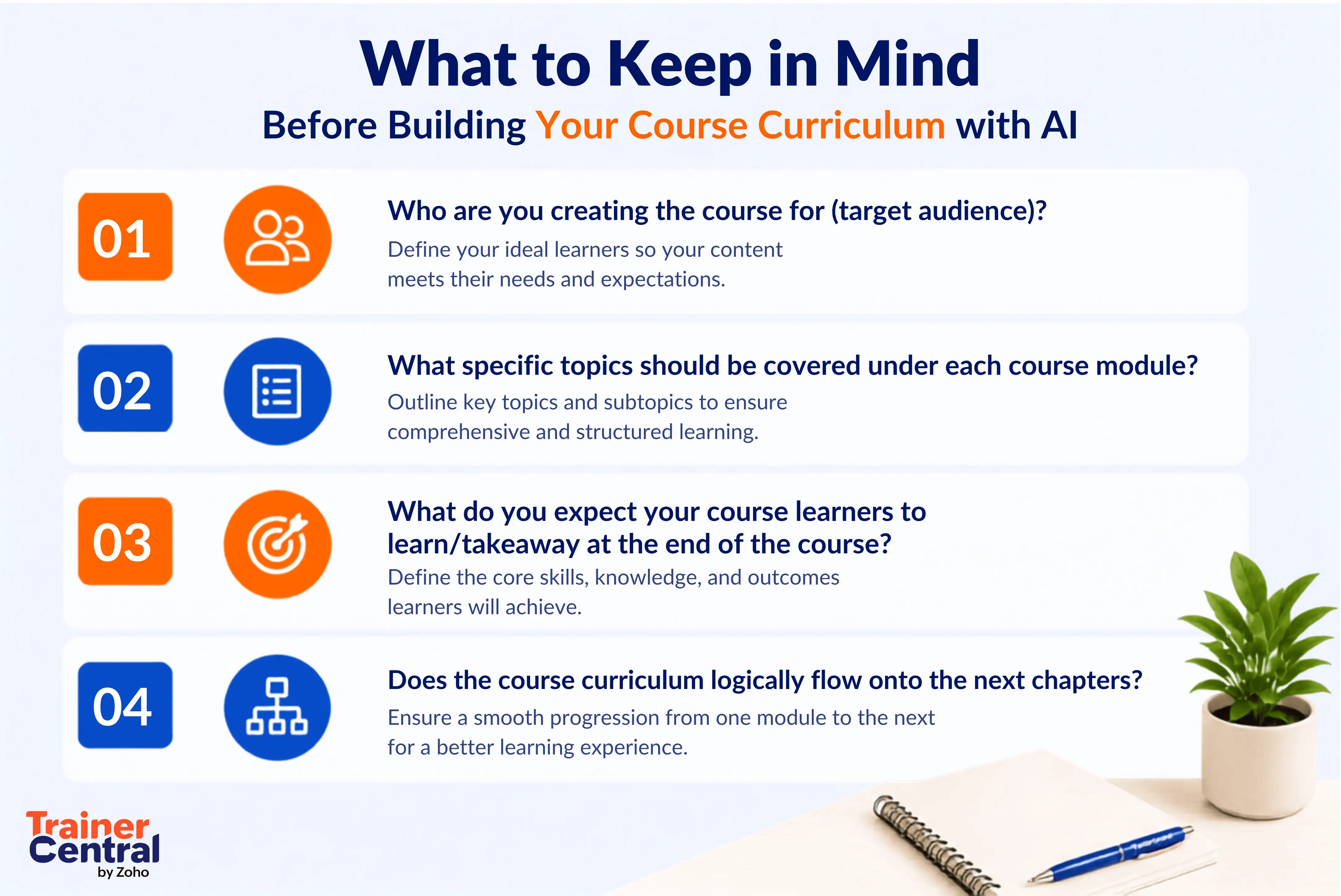
Try to add maximum clarity and personalization to your prompt. This will result in a more tailored course curriculum, eliminating the need for multiple iterations.
Recommended AI tools to build a course curriculum: ChatGPT, Claude, Gemini, NotebookLM.
Step 3: Creating engaging learning content
Now you have your title and course curriculum. The next step to creating an online course using AI is knowing how to generate the learning material for your courses.
This is where creators spend most of their time when planning their course. Fortunately for you, AI can help with this step as well, speeding up the overall course creation process significantly.
You may be wondering: If AI can generate the learning content, why would a student enroll and pay for a course? They might as well do it on their own.
Here’s where your expertise stands out. Students who enroll for a course want your perspective, your practical insights, and your way of explaining concepts. No AI-generated content can replace that.
But here’s where you can use AI to:
- Generate lesson drafts.
- Explain complex concepts in an easy, and a legible manner.
- Create real-world examples.
Once you’ve created all of the course content, go through it section by section because AI can hallucinate sometimes and even give incorrect information. Here’s what a sample prompt would look like.
ChatGPT prompt
Act as an experienced instructional designer and subject matter expert. Create a detailed lesson for Module [X], Lesson [Y] of my online course titled [“Course Name”].
The lesson should include:
- A clear introduction to the topic.
- Learning objectives.
- A step-by-step explanation using simple language.
- Real-world examples or case studies.
- Actionable tips and best practices.
- Common mistakes learners should avoid.
- A short lesson summary.
- A practical exercise or reflection activity at the end.
Write in a conversational, engaging tone suitable for [target audience] and avoid unnecessary jargon.
When you’re done, you can enhance the course by adding your personal real-world experiences, case study results, self-recorded videos, and more. The idea is to let AI generate the course, while you modify and enhance it with your personal teaching style and make it unique.
Put simply, you can let AI do all of the heavy lifting—the research work, course structuring, concept breakdowns, and more.
Recommended tools to generate lesson content: ChatGPT, Claude, Gemini.
Step 4: Create visual learning materials
If your online course is all text and no media, your learners aren’t going to engage with your course. In fact, this is one of the many reasons why learners drop out of your course.
The brain processes visuals up to 60,000 times faster than text, and incorporating visual aids can boost learning experiences and comprehension by up to 400% compared to traditional text-only formats.
In addition to videos, the most engaged online courses always include presentation slides, diagrams, worksheets, downloadable resources, and more. By including these materials in your course, you not only increase learner engagement but also improve your course completion percentage.
To create visually engaging materials, you can use tools like Gamma and Canva to create striking presentations. Tools like Napkin.ai help you easily convert text into images.
ChatGPT prompt
Act as an instructional designer and presentation expert. Create visual learning materials for Module [X] of my online course titled [“Course Name”].Include:
- A presentation outline with 10 to 15 slides.
- Suggested visuals or diagrams for each slide.
- An infographic summarizing the lesson.
- A downloadable worksheet.
- A practical checklist.
- A reusable template learners can apply in real-world scenarios.
Ensure that the content is visually engaging, beginner-friendly, and aligned with the lesson objectives.
While this prompt won’t generate the complete set of assets, it acts as a forerunner for your final creatives. While visual materials definitely help for your course, you need to find the balance between the two formats.
Recommended tools for creating visual materials: ChatGPT, Gamma, Canva Magic Design, Microsoft PowerPoint Copilot, Napkin AI, Adobe Express AI, Canva AI.
Step 5: Create assessments and learning activities
As a tutor, your job isn’t limited to only teaching your students. You also must ensure that they takeaway what they learn. This can be achieved using assessments and various learning activities.
Irrespective of any course you teach, adding assessments and giving students a certification at the end makes your course more authoritative, and imparts a sense of achievement.
You should include multiple choice quizzes, true or false questions, fill-in-the-blanks, and more. But manually creating quizzes for each topic and the entire course module is going to be difficult and time-consuming. So, you can use AI to get past this step.
ChatGPT prompt
Act as an instructional designer and assessment expert.
Create assessments for Module [X] of my online course titled [“Course Name”].Include:
- 10 multiple-choice questions with answers.
- 5 true or false questions.
- 3 short-answer questions.
- 2 scenario-based questions.
- 1 practical assignment learners can complete.
- 1 reflection question that encourages critical thinking.
- A grading rubric for the assignment.
Just like your lesson content, AI-generated assessments should be reviewed before publishing. Make sure to check each assessment you create aligns with the module’s learning objectives. Verify whether the questions are accurate, free from ambiguity, and that they’re more relevant for your audience.
Recommended tools for assessment creation: ChatGPT, Quizgecko, Revisely AI.
Step 6: Produce professional course videos with AI
AI doesn’t help with course generation alone. It goes beyond that and helps you create seamless videos for your online course. Previously, creating studio quality videos took a lot of time, effort, and money. But today, with AI, you don’t need an expensive production studio or professional editing skills anymore.
You can use AI to write engaging video scripts, translate your course videos into multiple languages, generate subtitles and captions, upscale videos, and more.
ChatGPT prompt
Act as an experienced instructional designer and video script writer.
Create a professional video script for Module [X], Lesson [Y] of my online course titled [“Course Name”].Include:
- A compelling introduction that captures attention.
- Learning objectives.
- A conversational explanation of the topic.
- Real-world examples or demonstrations.
- Natural transitions between sections.
- Key takeaways.
- A short recap at the end.
- A call-to-action encouraging learners to complete the assignment or move to the next lesson.
Once you’ve received the script, practice it well. You don’t have to follow it word for word. You can use that as a guidance for your videos. Sound natural and try keeping each topic specific what’s only needed.
Recommended AI tools for video creation: ChatGPT (script writing), Claude (long-form script refinement), VEED (subtitles and editing), Captions AI (automatic captions), ElevenLabs (AI voiceovers).
Step 7: Making your course launch ready
By this step, you should have created everything your online course needs; curriculum, lesson content, visuals, and assessments. But creating an online course is only half the journey. The next step is ensuring that your course is launch ready, so your learners will have a seamless experience.
Here’s a quick checklist on what you need for your course launch:
- A landing page that explains what the course is about and how it adds value to the user.
- Your instructor bio to add more credibility to the course.
- A welcome email for new course learners.
- A course completion certificate.
- A couple of social media posts to promote the course.
These are generally considered the prerequisites for launching an online course. The recommended AI tools help you with these activities are ChatGPT, Claude, Canva, and Grammarly.
Now, you have your online course, and the launch assets ready. But, your learners can’t purchase a couple of documents, videos, and presentations as an online course. You need to give them a professional learning experience. That’s where TrainerCentral comes in.
Step 8: Sell your online course with TrainerCentral
TrainerCentral is an online course platform where you can create courses, build websites, nurture communities, and reach learners worldwide. It allows creators, institutes, and enterprises to host live workshops, create on-demand courses, evaluate learners, collect payments, and more without needing multiple disparate tools.
This table highlights how TrainerCentral helps transform your content into a complete online course business
TrainerCentral allows multiple learning formats to make it easy for students. You can create self-paces courses, conduct live online classes, or even run cohort-based learning programs, all from a single platform.
Not only that, you can also build courses using TrainerCentral’s built-in AI capabilities that allows you to generate a course curriculum, create structured lesson content, and develop quizzes and assessments.
The fewer tools you rely on, the easier it becomes to manage your courses and deliver a consistent experience to your learners
| Course element | How TrainerCentral helps you |
| Course curriculum | Organize it into structured modules and chapters. |
| Lesson content | Create a self-paced online course. |
| Video lessons | Upload and stream securely. |
| Upload and stream securely | Add quizzes, assignments, and certifications. |
| Visual resources | Share worksheets, templates, and downloadable files. |
| Landing page | Publish a branded course website. |
TrainerCentral allows multiple learning formats to make it easy for students. You can create self-paces courses, conduct live online classes, or even run cohort-based learning programs, all from a single platform.
Not only that, you can also build courses using TrainerCentral’s built-in AI capabilities that allows you to generate a course curriculum, create structured lesson content, and develop quizzes and assessments.
The fewer tools you rely on, the easier it becomes to manage your courses and deliver a consistent experience to your learners.
Common mistakes to avoid when creating an online course with AI
Now that you know how to create an online course with AI, it’s important to know how to avoid some of the mistakes course creators are bound to make.
Letting AI write everything without adding your expertise
AI-generated content looks decent without reviewing or personalizing it. But it lacks your expertise, your unique teaching style, and insights. That’s what learners sign up for; not some AI-generated content.
So, use AI to generate the first draft, like we did in TrainerCentral. And then, enhance it with personal stories, industry examples, and case studies that only you can provide by you.
Creating long lessons
The longer your lessons are, the lower the course completion rate will be.
Learners get a sense of achievement when they complete a topic or a module and move on to the next one.
So, instead of packing everything into an one-hour topic, break it into multiple 20-minute concepts. Short, focused lessons are easier to consume, revisit, and remember.
Skipping learner feedback before launch
No matter how experienced you are, having an extra pair of eyes look at your course can only make it better.
So, before launching your course, share it with a few colleagues, subject matter experts, or beta learners to get some honest feedback. Even small improvements before launch can lead to significantly better learner satisfaction and reviews.
Publishing courses without assessments
Let’s say you’re creating a self-paced course with no live workshops. How can the students assess themselves and increase their confidence?
Adding quizzes and assignments gives learners an opportunity to measure their progress while establishing a sense of achievement. This makes them want to learn more and eventually complete the course.
Failing to update your course over time
Creating and launching an online course isn’t a one-off thing. Look at the image below to see why.
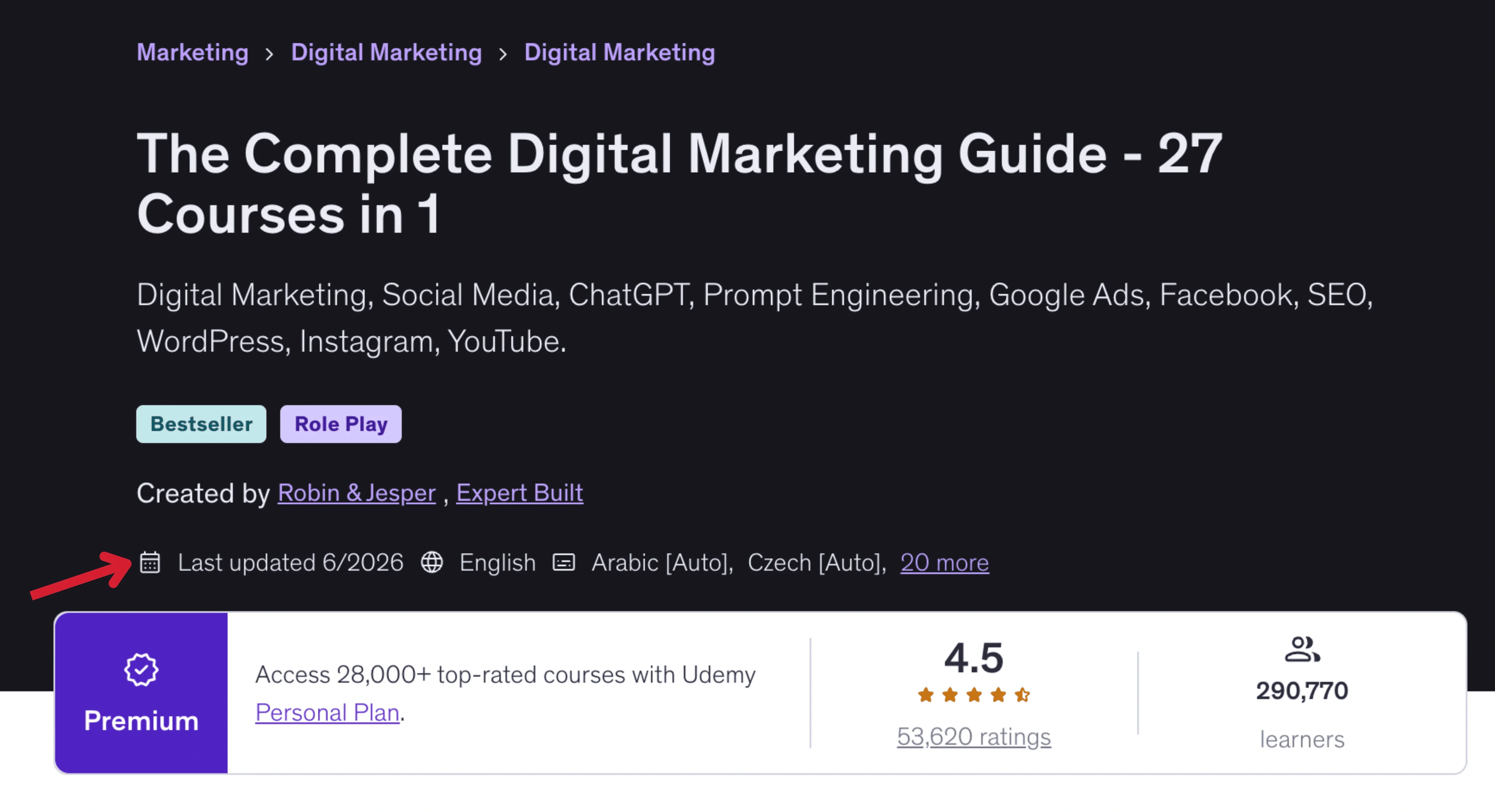
This a Digital Marketing course from Udemy. As you can see, the author is continuously updating the course. The course was last updated just a couple of weeks before we wrote this article. And that’s probably one of the reasons why it has close to 300,000 users and an incredible rating.
So, it’s important that you review your course regularly to update outdated information, add new examples, and improve lessons based on learner feedback.
Final thoughts
AI has made online course creation much easier now. AI can validate your course idea, build a structured curriculum, generate lesson content, create assessments and even design visuals you. You can do all of this in a fraction of the time it once took.
But again, remember that AI is only your assistant, meant to help get things done faster. Your expertise, teaching style, and real-world experience is what makes an AI-generated course valuable and learner-worthy.
What’s even more important than creating an online course is deciding where you’re going to host it. Instead of juggling between multiple tools for hosting videos, conducting live classes, collecting payments, and evaluating learners, the wise option would be to choose an all-in-one platform like TrainerCentral.
Combining your courses with the right online training platform will help deliver an amazing learning experience, help you gain credibility, and save you from repetitive tasks.
Now there’s only one thing left to do: Publish your course and share your expertise with the world.