- HOME
- Building a business
- Create, assess, certify, and renew: The complete tool kit for online certification programs
Create, assess, certify, and renew: The complete tool kit for online certification programs
- Last Updated : August 17, 2026
- 61 Views
- 8 Min Read

If you're running a certification program, you already know that there's more to it than just issuing certificates when learners complete their courses. A robust certification program needs to define what learners should know, help them acquire that knowledge, assess their proficiency, and provide a credential that validates their achievement.
Broadly, a well-designed certification program has three important parts:
1. Create a structured learning experience: Build the courses, lessons, workshops, and resources learners need to acquire the required knowledge.
2. Assess and certify learners: Evaluate their understanding through tests, assignments, or other assessment methods and certify those who meet your requirements.
3. Keep certifications current: Where necessary, establish an expiry and renewal cycle, update the learning material, bring learners back for reassessment, and issue an updated credential.
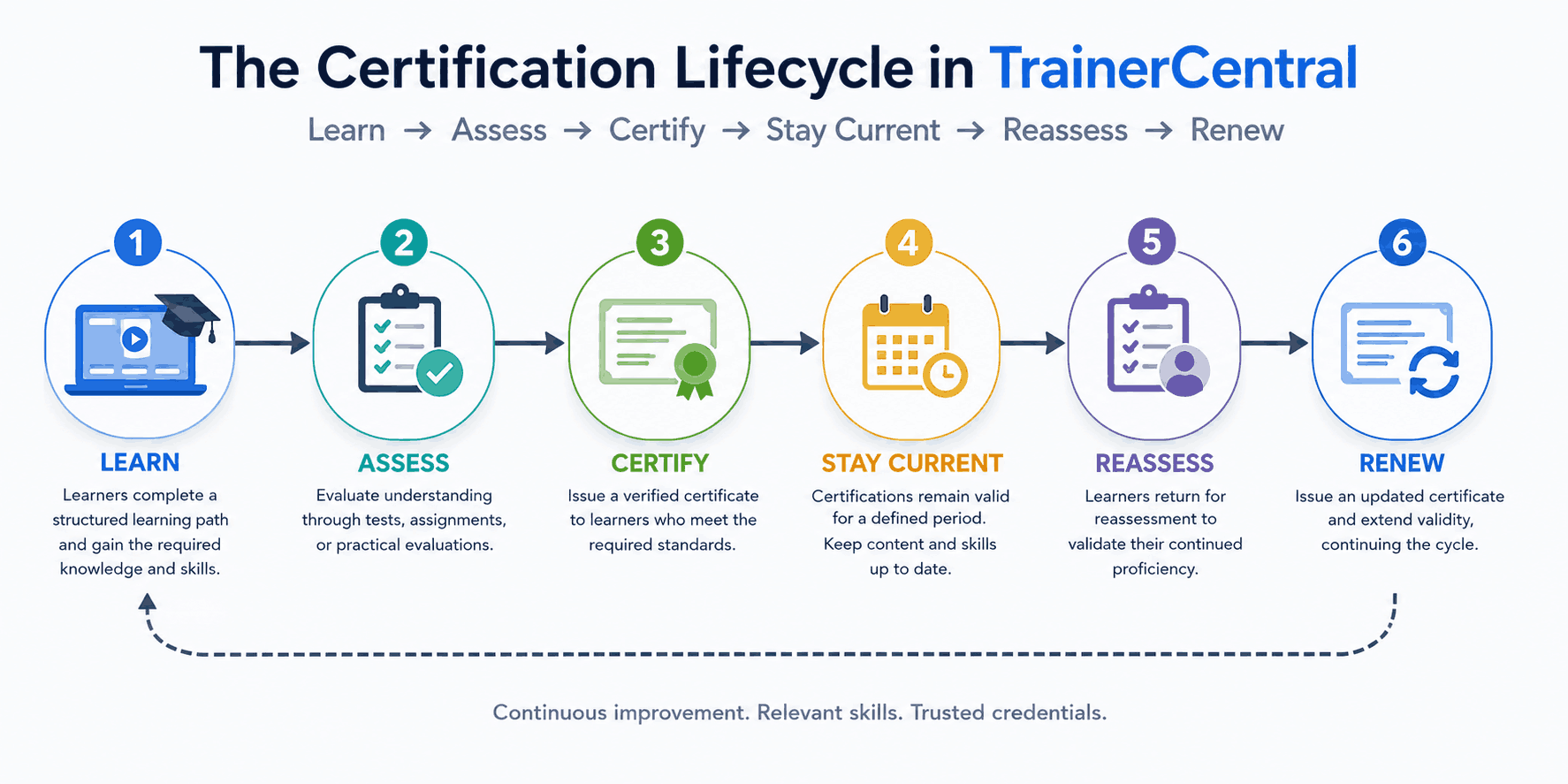
This kind of system creates a continuous certification lifecycle:
Learn → Assess → Certify → Stay current → Reassess → Renew
TrainerCentral helps you manage this entire certification lifecycle, from creating courses and assessing learners to designing certificates, issuing verifiable credentials, and keeping certifications current.
Here's how you can set it up.
1. Define what your certification should represent
Start with the outcome rather than the certificate. What should somebody who holds your certification be able to demonstrate?
For example, a Certified Product Implementation Partner might need to:
Understand the product and its core capabilities
Configure customer accounts correctly
Recommend an appropriate implementation approach
Work with integrations
Follow security and implementation best practices
Troubleshoot common issues
Once you've defined the competencies, decide what learners need to do to become certified. Your program could follow a structure such as:
Complete required learning → Pass module assessments → Complete final evaluation → Earn certification
2. Create the certification learning path
Next, turn those requirements into a structured course. Every business and their training needs are different, so the optimal learning method depends on your requirement. It can either be a fully self-paced course, an instructor-led one, or a hybrid learning system.
Let's take the implementation partner example. The partners might be spread out across the world, so most of the learning is self paced. For this, your certification curriculum might look something like this:
Module 1: Product fundamentals
Module 2: Account configuration
Module 3: Integrations
Module 4: Implementation methodology
Module 5: Security and best practices
Module 6: Troubleshooting
Module 7: Real-world implementation scenarios
Module 8: Final certification assessment
The objective is to prepare learners for what they will eventually be expected to demonstrate.
In TrainerCentral, you can easily start creating an online course with a mix of videos, PDFs, presentations, and images. You can also mandate the lesson order and set prerequisites to ensure learners follow the intended learning path without skipping required lessons.
Once you've created the learning path, the next step is to decide how you'll evaluate whether learners have actually acquired that knowledge.
3. Evaluate learners before certifying them
A certificate is more meaningful when there is a clear standard for earning it. Use assessments throughout your certification program to establish whether learners have understood the required material. Depending on what you're certifying, this could include tests, assignments, or a combination of both.
For example, a product certification could use short tests after individual modules to reinforce learning, followed by a broader assessment at the end. A program focused on practical skills might instead ask learners to complete an assignment or demonstrate how they would handle a real-world scenario.
The assessment model should reflect what the certification claims the learner can do. Once learners satisfy the required learning and assessment criteria, you can turn their achievement into a credential.
4. Design and personalize your certificates
Once you've set up the learning and assessment criteria, the next step is to decide what the learner certificates should look like and contain.
In TrainerCentral, you can create and customize certificates using the built-in Certificate Editor. You don't have to create certificates in an external design tool and manually personalize them for every learner. You can design a certificate once, add the information you want it to display, and TrainerCentral can automatically personalize it when it's issued.
Customize the certificate to match your brand
The Certificate Editor gives you control over the different elements that make up your certificate. You can add and customize headings, subheadings, body text, images, and other elements and adjust their font, size, color, alignment, styling, and position.
You can also add your organization's logo and other brand assets and customize the background to create a certificate that matches your academy or certification program. For example, for the implementation partner program we've been building, the certificate could prominently feature ''Certified Product Implementation Partner'' along with the learner's name, organization, completion date, and other information relevant to the certification.
Personalize certificates with dynamic fields
Of course, you don't want to manually edit the certificate every time someone gets certified. TrainerCentral's dynamic fields help you add information that changes automatically depending on the learner receiving the certificate. This can include information such as the learner's name, course name, course completion date, organization name, trainer name, and trainer designation.
You can also bring information collected through your academy's Master fields and signup fields into the certificate. This can be particularly useful for certification programs involving learners from different organizations.
Say you're running the same implementation partner certification for 500 partners across 50 companies. You can design one certificate and have the relevant learner and organization information populated automatically when each certificate is generated.
Create templates you can reuse across certification programs
If you're planning to run multiple certification programs, you don't have to recreate your certificate design every time. TrainerCentral's Certificate Templates library lets academy admins create and manage certificate templates that can be reused across courses.
For instance, you might create a common branded template and adapt it for different levels of your certification:
Foundation → Professional → Advanced → Expert
This also helps maintain a consistent identity across your certification programs as your academy grows.
Before making the certificate available to learners, preview it and use the Send me a sample option to see how the final certificate looks. This is especially useful for checking dynamic fields; long learner names, organization names, and course titles shouldn't break an otherwise perfect certificate design.
Once the design is ready, there's another important question to address: How does someone know that the certificate is authentic?
That's where TrainerCentral's certificate verification features come in.
5. Make your certificates verifiable
A certificate is more valuable when its authenticity can be verified. This is particularly important for professional and partner certification programs, where learners may use their credentials to demonstrate their expertise to employers, customers, or other organizations.
TrainerCentral provides two ways to connect an issued certificate to its credential record: a Credential ID and a QR code.
Add a unique Credential ID
TrainerCentral automatically generates a unique Credential ID for every certificate issued to a learner.
You can add this Credential ID to your certificate directly from the Certificate Editor. So, instead of the certificate being just a downloadable document, it also carries a unique identifier associated with that learner's credential.
For example, two learners may earn the same Certified Product Implementation Partner certification, but the certificates issued to them will have different Credential IDs.
This makes each issued certificate individually identifiable and, more importantly, verifiable.
Add a QR code for instant verification
You can also add a QR code to the certificate from the Certificate Editor. The QR code provides a much quicker way for someone viewing the certificate to check its authenticity. Instead of manually entering the Credential ID, they can simply scan the QR code and access the credential's verification details. This can be useful when a learner shares a digital copy of their certificate, includes it in a professional portfolio, or displays a printed version.
So, while the Credential ID uniquely identifies the certificate, the QR code makes it easier to access and verify that credential. Both ultimately connect to another important part of the certification system: the certificate v.
TrainerCentral provides a dedicated Certificate Validator where anyone can verify a certificate issued through your academy. All they need to do is enter the certificate's unique Credential ID, and the corresponding certificate will be displayed on the page. This gives employers, customers, and other third parties a simple way to check whether a learner's certification is authentic.
6. Let learners showcase their certifications
Earning a certification is one thing. Learners should also be able to showcase it outside your academy, especially when the certification represents a professional skill or competency. TrainerCentral lets learners access their earned certificates from their profile and download them whenever required.
Share certifications on LinkedIn
Learners can also add their TrainerCentral certificates directly to the Licenses & Certifications section of their LinkedIn profile.
When they choose to share a certificate, TrainerCentral can carry over relevant credential information such as:
Certification name
Issuing organization
Issue date
Expiry date
Credential ID
Credential URL
This saves learners from having to manually enter all the certification details and, more importantly, connects the certification displayed on their LinkedIn profile with a verifiable credential.
For our implementation partner example, partners can add the certification to their LinkedIn profiles to demonstrate their product expertise to prospective customers and employers.
This way, the certification doesn't remain confined to the course or academy. Learners can take the credential with them and use it as proof of what they've achieved.
7. Keep certifications current with expiry and renewal
Not every certification should remain valid forever. This is especially true when you're certifying knowledge that changes frequently, such as software products, compliance requirements, industry standards, or professional skills.
With TrainerCentral, you can set a validity period for certificates, after which the certification expires. This helps ensure that a credential represents a learner's current knowledge rather than something they demonstrated several years ago.
But expiry should ideally be tied to a renewal process.
For example, let's say our Certified Product Implementation Partner certification is valid for one year. During that year, the product may have introduced new features, integrations, or implementation practices. Before renewing their certification, partners can be asked to complete updated learning material and take another assessment.
The certification lifecycle then becomes:
Get certified → Certification remains valid → Complete updated learning → Get reassessed → Renew certification
Notify learners before their certification expires
Learners shouldn't find out that their certification has expired only when they try to use it. For certifications with an expiry date, you can set up notifications to remind learners as their certification approaches expiry. This gives them enough time to complete any required learning or assessments and renew their certification.
This is particularly useful when you're managing certification at scale. Instead of manually keeping track of when hundreds of individual certificates expire, you can build expiry and renewal into the certification process itself.
That way, your certification doesn't simply prove that someone once knew the subject; it helps ensure that their knowledge remains current.
Conclusion
Running a certification program involves much more than creating a course and issuing a certificate. You need to define what learners should know, provide the right learning experience, assess their knowledge, issue credentials that can be verified and shared, and, when necessary, ensure those credentials stay current through expiry and renewal.
TrainerCentral brings these different parts of the certification lifecycle together in one place. This makes it easier to build a structured certification program that continues to work as your program grows.
Ultimately, a certification is only as valuable as what it represents. By combining structured learning, meaningful assessments, verifiable credentials, and regular renewal, you can build a certification program that learners are proud to earn and others can trust.