- HOME
- Product news
- Introducing TrainerCentral 2.0: One platform, expanded capabilities, and greater scalability
Introducing TrainerCentral 2.0: One platform, expanded capabilities, and greater scalability
- Last Updated : September 10, 2026
- 314 Views
- 6 Min Read


AI is rapidly transforming online training, helping trainers create better learning experiences and run their training businesses more efficiently. TrainerCentral 2.0 brings these possibilities together in one platform, with new capabilities designed to simplify how training is created, delivered, managed, and scaled.
The latest release introduces Zia, TrainerCentral's new AI assistant, along with SCORM support, standalone assessments, learner communities, dynamic watermarking, a secure desktop app, and a completely redesigned platform experience.
Together, these capabilities make TrainerCentral a complete platform for creating, delivering, managing, and growing modern training programs.
Whether you're launching an academy, training thousands of learners, or enabling customers and partners globally, TrainerCentral 2.0 gives you the tools to deliver better learning experiences and scale with confidence.
TrainerCentral 2.0: One platform, expanded capabilities, and greater scalability
What’s new in TrainerCentral 2.0
Zia, TrainerCentral's new AI assistant: Helps generate course curriculum, lesson content, assessments, and get business insights instantly.
SCORM courses: Import, deliver, and track SCORM-compliant learning content.
Communities: Build learner communities and create new monetization opportunities.
Standalone assessments: Create and sell assessments independently of courses.
Dynamic watermarking: Protect videos and PDFs with personalized watermarks.
Learner desktop app: Secure learning and high-integrity assessments on Windows and macOS.
Create smarter with Zia, TrainerCentral's new AI assistant
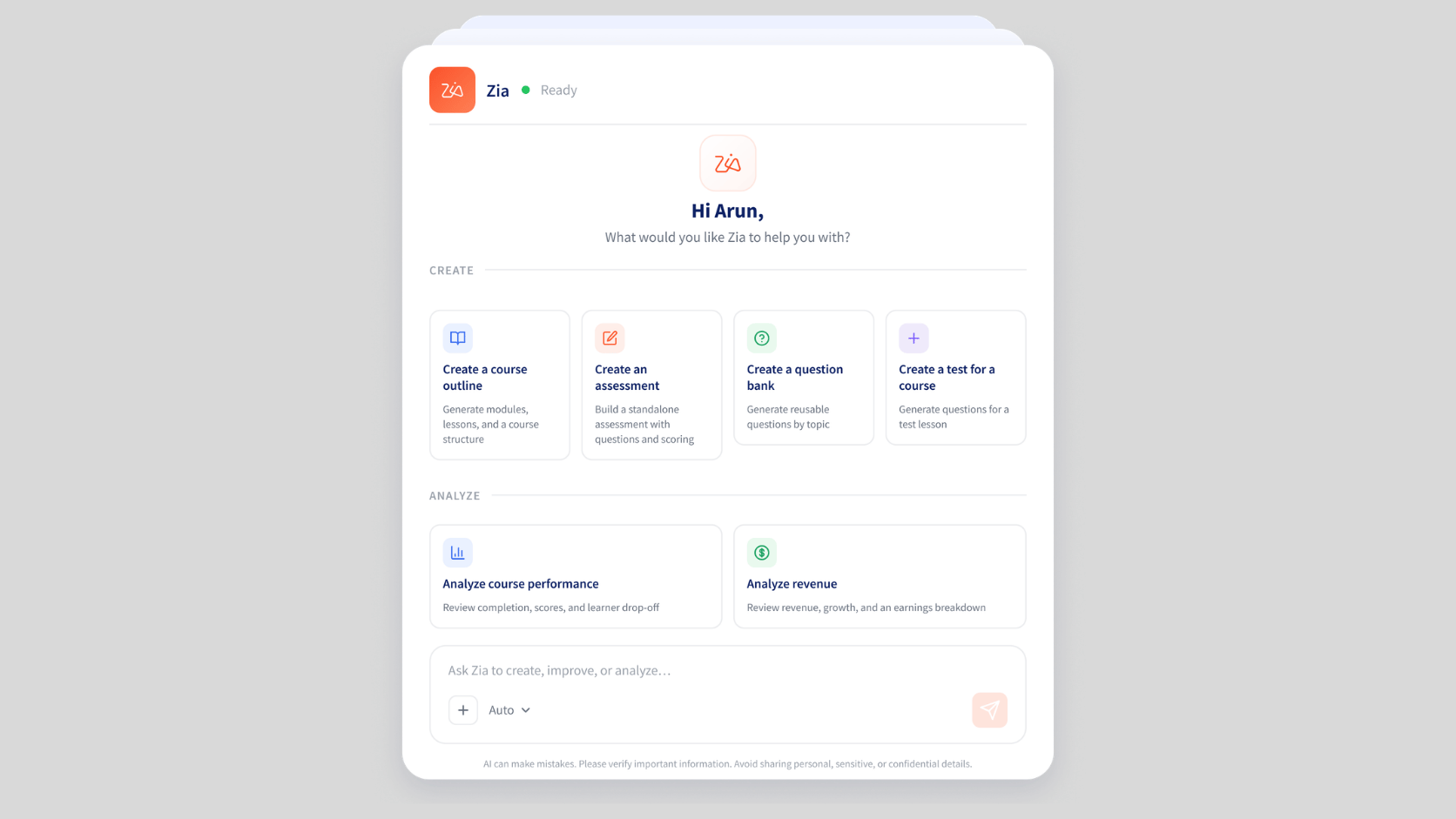
The new TrainerCentral AI assistant empowers trainers with an intelligent workspace that streamlines online course creation and improves business productivity.
Built directly into the platform and accessible wherever you need it, the AI assistant helps you create course content faster, assess learner performance, and uncover business insights.
AI helps you accomplish more in less time, making it easier to scale your academy without increasing your workload.
Build course curriculum faster with Zia
Every course begins with an idea. The AI assistant helps you turn that idea into a well-structured curriculum within seconds.
Simply describe the topic you want to teach, and it generates a course outline complete with modules and lessons, giving you a strong foundation to build on. You can iterate and tweak the curriculum as needed with additional prompts. You can save the generated curriculum directly as a draft course.
Instead of starting with a blank page, you can start with a complete framework and focus on refining your expertise.
Create lesson content with Zia
You can now use Zia AI assistant to help generate text-based lesson content. All you have to give is a detailed prompt and Zia will generate the lesson content. It creates a first draft in seconds, which you can review, refine, and adapt to your teaching style.
Build assessments with Zia
Zia also makes assessment creation faster. Generate single-choice, multiple-choice, and true-or-false questions instantly using simple prompts. You can also build reusable question banks and automatically randomize questions for each learner.
Whether you're creating weekly quizzes, certification exams, or practice tests, Zia helps reduce the time spent building assessments.
Turn academy data into business insights
Business insights are now just a prompt away. Ask a question in plain language, and Zia analyzes your academy data to surface relevant insights, helping you make faster decisions and identify opportunities for growth.
Which course generated the highest revenue this month?
Which learners have the lowest completion rate?
Which assessment has the highest failure rate?
What are my best-selling courses?
Learn how to configure Zia for your academy ->
Bring your SCORM content into TrainerCentral
TrainerCentral now lets you directly upload and deliver SCORM courses while managing them alongside your native TrainerCentral courses.
Learners can access SCORM courses just like any other course in your academy, while learner progress and course progress are automatically tracked.
SCORM support also opens the door to new business opportunities. You can confidently work with organizations that rely on SCORM as their preferred learning standard, while continuing to use TrainerCentral as your single platform for course delivery and learner management.
Learn how to set up SCORM courses for your academy ->

Build communities that keep learners engaged
With TrainerCentral Communities, you can build a dedicated space where learners connect, ask questions, share ideas, and continue learning. Unlike course discussion forums that are limited to individual courses, Communities bring your entire academy together in one place.
You can offer communities for free or charge a one-time membership fee. Whether you're running cohort-based programs, certification academies, coaching businesses, or customer education initiatives, Communities help transform one-time learners into an engaged audience that keeps coming back.
Key capabilities
Create free or paid communities
Build academy-wide spaces for discussions and collaboration
Invite external members and grow your audience
Foster continuous learning beyond individual courses
Learn how to create and manage online communities ->
Create and sell assessments independently
In TrainerCentral 2.0, you can create, publish, and sell assessments independently of courses. Whether you're offering certification practice exams, mock tests, aptitude assessments, diagnostic tests, or recruitment evaluations, you no longer need to package them inside a course.
Creating assessments is just as flexible. Build large question banks, organize questions by topic or difficulty, and automatically randomize them for every learner. This ensures every assessment remains unique while significantly reducing the effort involved in creating and managing multiple tests.
When assessment integrity is critical, you can deliver them securely through the TrainerCentral Desktop App with Kiosk Mode, giving learners a controlled testing environment while reducing opportunities for cheating or unauthorized activity.
Standalone assessments open up entirely new business opportunities for coaching centers, certification providers, corporate trainers, educational institutions, and businesses that rely on testing as part of their training or hiring process.
Key capabilities
Create assessments independently of courses
Sell assessments as standalone products
Build reusable question banks
Automatically randomize questions for every learner
Set up prerequisites to ensure learners progress through required sequence
Deliver assessments securely through the TrainerCentral Desktop App
Learn how to create and sell standalone assessments ->
Robust security for your course content
Every course you create represents hours of planning, research, and expertise. Protecting that content shouldn't require additional tools or complicated workflows.
TrainerCentral 2.0 introduces Dynamic content watermarking, giving you greater control over how your premium content is shared. Add personalized watermarks to course videos and PDFs using your organization's logo, custom text, or learner information such as their name or email address.
You can also customize the watermark's movement and opacity to match your branding while making screenshots, recordings, and unauthorized sharing far less useful. Since each learner sees a unique watermark, shared content can be traced back to its source, helping discourage piracy without affecting the learning experience.
Key capabilities
Add dynamic watermarks to videos and PDFs
Use your logo, custom text, or learner information
Customize watermark movement and opacity
Discourage unauthorized sharing and content piracy
Protect premium learning content without impacting the learner experience
Learn how to set up dynamic watermarking -> 
Deliver secure learning with the new desktop app
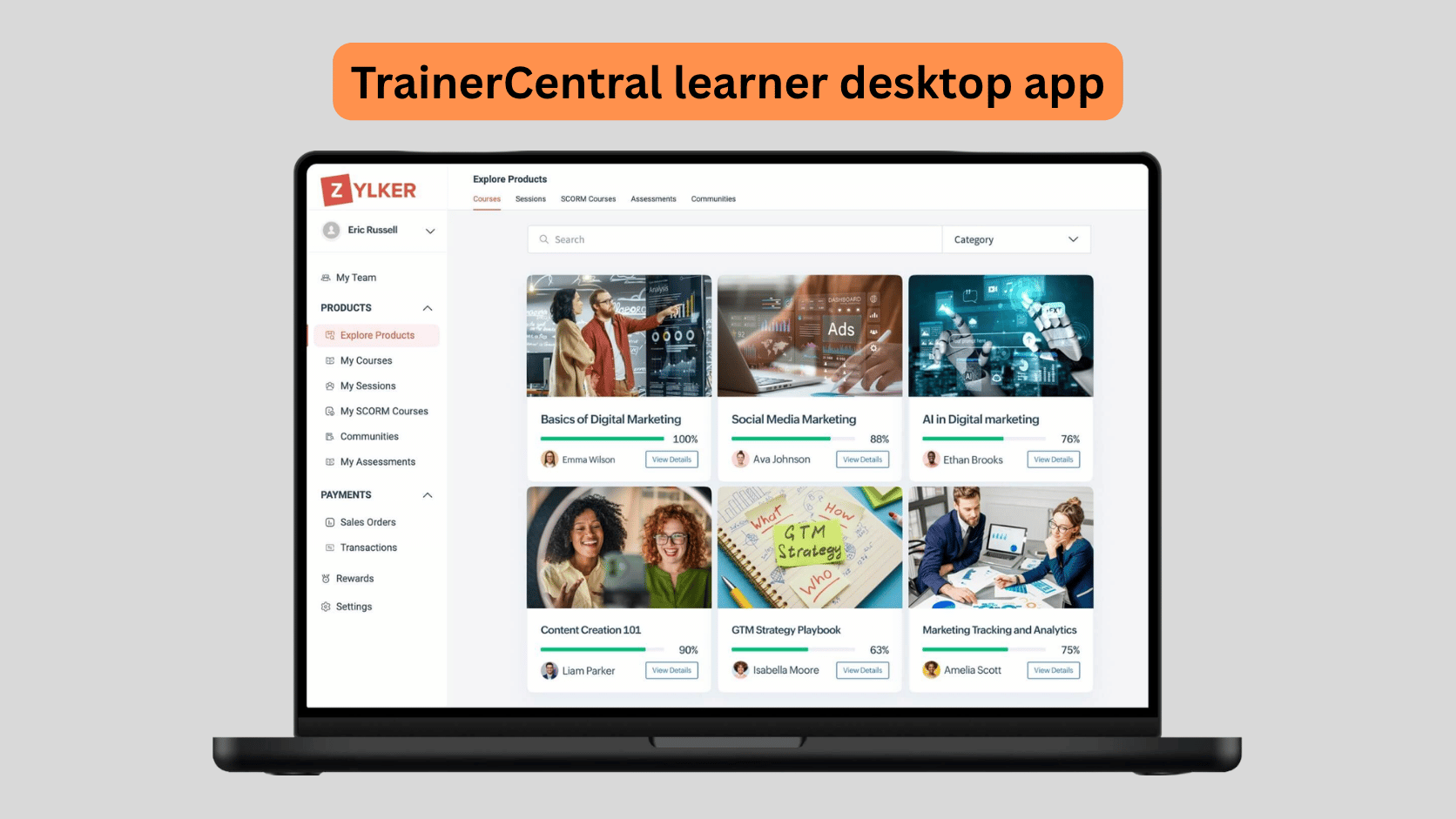
TrainerCentral 2.0 introduces the TrainerCentral learner desktop app for Windows and macOS, giving learners a more secure way to access your academy.
By default, the app blocks screen recording and screen sharing, helping protect your course content from unauthorized capture and distribution.
The same protection is also available on the TrainerCentral mobile app, ensuring your content remains secure across devices.
For assessments, the desktop app goes a step further with Kiosk Mode. It creates a controlled testing environment by preventing learners from switching applications, copying content, using external displays, or accessing unauthorized resources during an assessment.
Trainers can also choose to make their academy accessible only through the Desktop App, ensuring every learner enters a secure environment.
Key capabilities
Dedicated desktop applications for Windows and macOS
Block screen recording and screen sharing during learning
Secure Kiosk Mode for assessments
Prevent app switching, copying and pasting, and the use of external displays
Restrict academy access to the Desktop App when required
Built-in screen recording and screen sharing protection on the TrainerCentral mobile app
TrainerCentral learner desktop app download links
Windows: Download here | macOS: Download here
Wrapping up
TrainerCentral 2.0 marks an important step forward in how we support trainers and businesses as their training needs evolve. It gives you more room to create richer learning experiences, expand your offerings, and manage growing programs without adding unnecessary complexity.
With TrainerCentral 2.0, you have the tools to build on your existing programs, explore new opportunities, and grow your training business with greater confidence.